How to Organize Your Data (Using Excel or Google Sheets)
Published: June 6th, 2025
Learning Objective: Help small business owners organize existing data for better insights.
Introduction:
A messy spreadsheet is a nightmare that even the most powerful tools can’t fix. If you are tracking sales, managing client bookings, or planning promotions, your insights are only as good as your data. Clean, well-structured data is essential for every business.
What Does Clean Data Look Like?
Clear Headers: Columns should have clear, descriptive titles that mirror the information they hold. For example, "Date" , not “When”, “Customer Name”, not “person or who”, “Amount Paid”, not “how much” are good titles for columns.
One Row = One Record: Every row should represent a single transaction or entry.
Consistent Formatting:
Dates must be in the same format of MM/DD/YYYY. Don’t combine “08/20/1955” and “20th August 1955”.
Numeric values only- Don’t mix Numbers with text- Don’t combine “35” with “Thirty-five”.
Avoid symbols like $20 or 30% in the numeric fields. Use raw values instead.
No Merged Cells: Merged cells change the structure, and makes analysis more difficult. You want to keep your sheet flat and simple.
Common Issues to Watch For
Missing values: All values should be filled.
Mismatched formats: Don’t store numbers as text or as mixed formats.
Inconsistent nulls: Use a default placeholder, like “Unkown”, or an estimated value, say mean, rather then leave them blank.
Case Study: Bessie’s Skincare Data

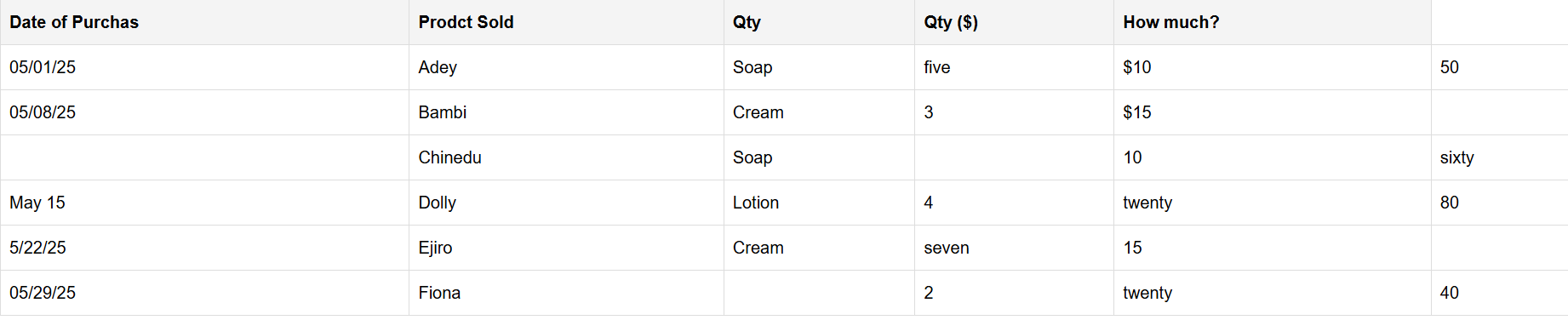
Bessie runs a small but growing skincare shop and has been collecting order data for over three years. Inspired by Ema's Data ED series, she finally decides to dig into her old spreadsheets. She finds out that she has:
Misspelled headers like "Prodct Sold" and "How Much?"
Missing customer names and addresses
Inconsistent price formats: "$20", "twenty"
Merged cells and vague sales dates like "Jan" or "Last Week"
Original Messy Table:
How Bessie Fixed Her Data
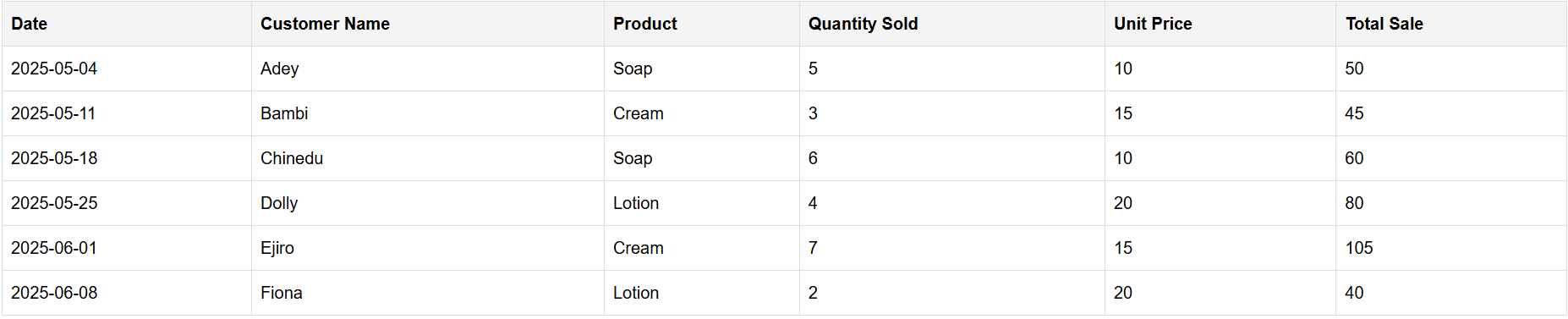
Unmerged all cells- to keep one data point per cell.
Renamed columns clearly- “Product Name,” “Order Date,” “Quantity,” “Price,” etc.
Standardized dates, numbers, and text formats- numbers without currency signs, dates in proper format (MM/DD/YYYY), and consistent capitalization.
Replaced missing records- by either retrieving records from receipts or leaving them blank but labeled for review.
Split combined columns- some had “2 jars - $50” in one cell. She split these into Quantity and Price, and added a discount column to track how much was given off each sale.
Cleaned Table:
What She Plans To Do Going Forward
To avoid repeating the mess, Bessie put a simple system in place:
New Template: A clean Excel/Google Sheet for each new month
Data Entry Rules: No merged cells, dropdowns for products, date format, or required fields
Weekly Reviews: Friday data checks
Backups: Monthly saves with version names like
March2025_Sales.xlsx
In Summary
“Clean data isn’t about being perfect, but about being consistent, clear, and structured. Like Bessie, you don’t need fancy software to get started, just a plan.”
